⚒️ Persiapan
Sebelumnya kita perlu menyiapkan docker compose yang tepat untuk menggambarkan situasi sebenarnya di production.
Baca Juga : Memulai proyek dengan docker image mochrira/dev
Edit file vhost.conf, ubah document root ke /var/www/html.
<Directory /var/www/html>
    Options FollowSymLinks Indexes
    AllowOverride all
    Require all granted
</Directory>

<VirtualHost *:80>
    DocumentRoot    /var/www/html

    <Directory /workspace>
        Options FollowSymLinks Indexes
        AllowOverride all
        Require all granted
    </Directory>
</VirtualHost>
Lalu edit juga file compose.yaml dengan mengarahkan folder www dan api ke subdirektori dari /var/www/html.
name: subdir
services:
  dev:
    container_name: subdir_container
    image: mochrira/dev:latest
    volumes:
      - ../:/workspace
      - ../www:/var/www/html/subdir
      - ../api:/var/www/html/subdir/api
      - ./vhost.conf:/etc/apache2/conf.d/vhost.conf
    environment:
      - NG_INSTALL=YES
      - NG_VERSION=17
    networks:
      - environment
      - database
    ports:
      - 9090:80

networks:
  environment:
    external: true

  database:
    external: true
Dengan konfigurasi diatas, maka proyek dapat diakses diakses di browser dengan mode subdirektori http://app.local/subdir.
😭 Masalah Utama
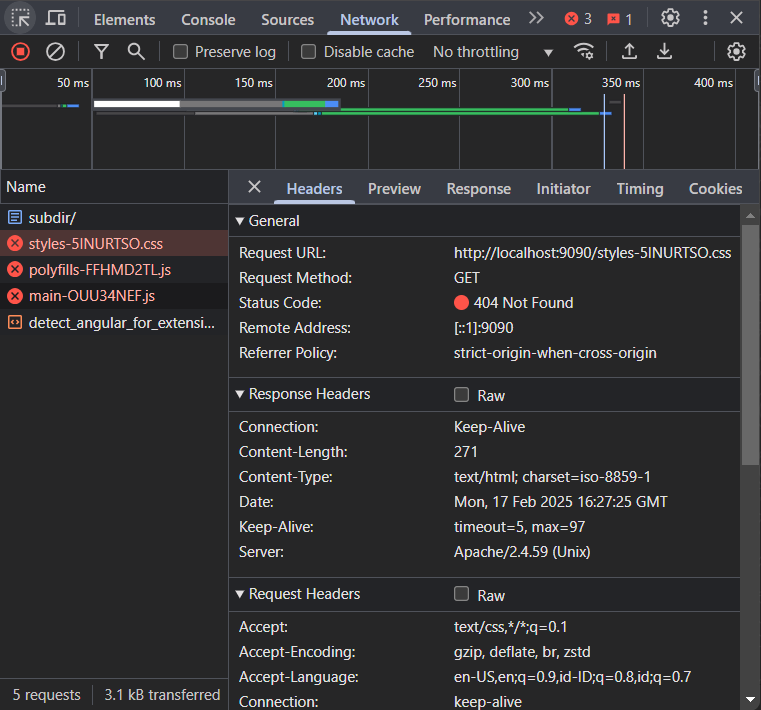
Seluruh aset kita tidak termuat (404 Not Found). Masalah utama terlihat pada Request URL yang salah saat saat pengambilan style (seharusnya: http://localhost:9090/subdir/styles-xxx.css).
😎 Penyelesaian
Masalah diatas dapat diselesaikan dengan hanya mengubah base href pada file index.html
<!doctype html>
<html lang="en">
<head>
  <meta charset="utf-8">
  <title>SubdirApp</title>
  <base href="/subdir/">
  <meta name="viewport" content="width=device-width, initial-scale=1">
  <link rel="icon" type="image/x-icon" href="favicon.ico">
</head>
<body>
  <app-root></app-root>
</body>
</html>
😧 Sesimpel itu?
Sayangnya tidak, saat mulai menggunakan routing dan user mencoba refresh aplikasi dari browser, aplikasi akan gagal dimuat dengan masalah yang sama, namun uri route dikenali sebagai subdirektori. Hal ini dapat diatasi dengan menambahkan RewriteBase pada .htaccess
RewriteEngine On
RewriteBase /ujian
RewriteCond %{REQUEST_FILENAME} !-d
RewriteCond %{REQUEST_FILENAME} !-f
RewriteRule ^ index.html [L]